Bot Admission and Waiting Room Handling in Enterprise Meetings
Enterprise platforms now require explicit approval before meeting bots join calls.
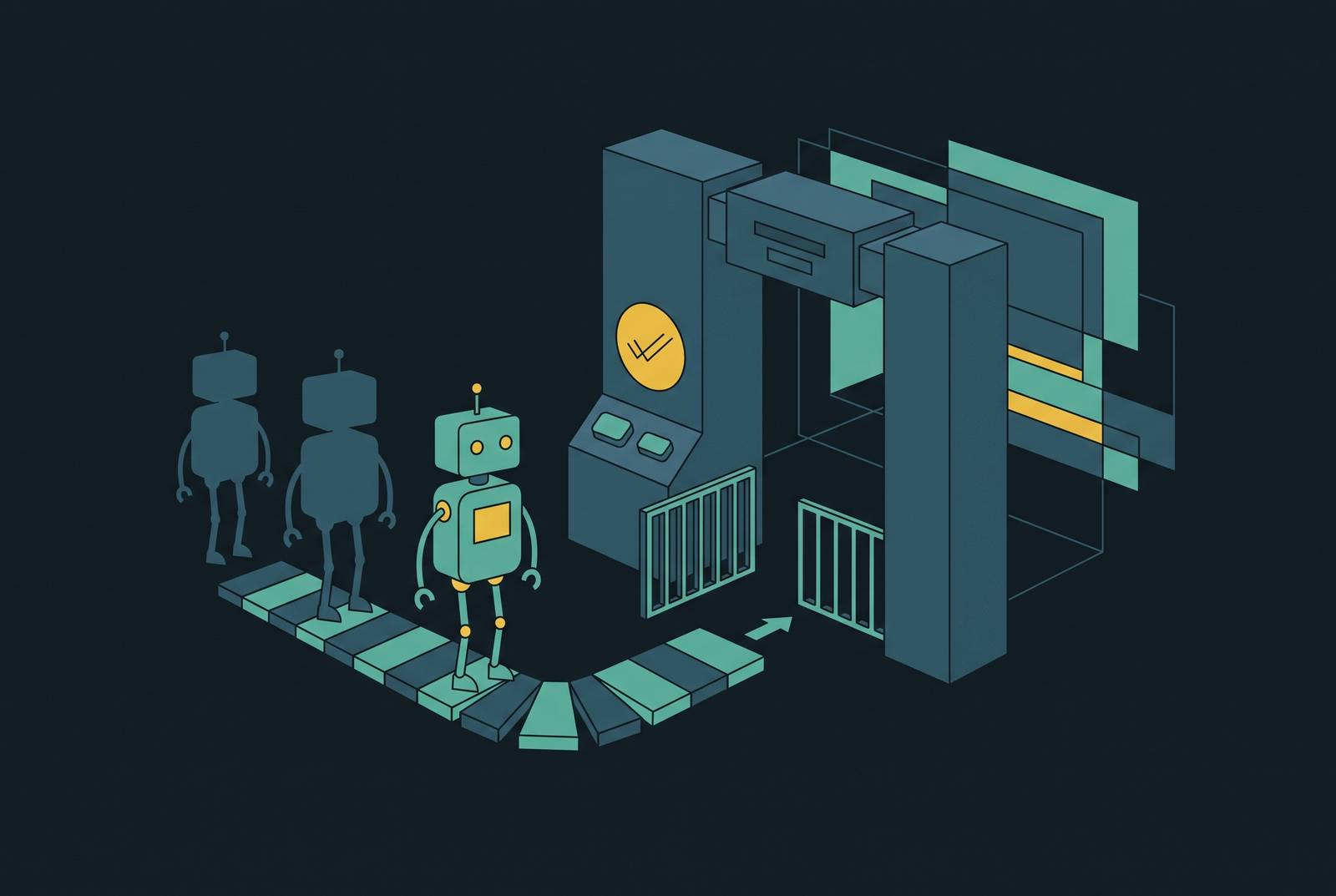
Meeting bots stopped being background noise on enterprise calls sometime in early 2026, when Microsoft and Google each rolled out lobby controls that force organizers to decide, deliberately, whether an AI notetaker gets in. Before that, tools like Otter.ai, Fireflies.ai, Read.ai, and Fathom joined calls as named participants, sat in the meeting, recorded everything, and mostly nobody thought twice. The platforms have now built the plumbing to stop that from happening by accident. What follows is a plain account of how that plumbing works, why it arrived when it did, and what admins and organizers need to configure before the next phase lands.
The pattern that got everyone here wasn't malicious. It was neglect. An organizer sets a Teams meeting to let external attendees bypass the lobby, usually to make life easier for a partner or vendor joining regularly. That same open door lets a bot walk straight in. Microsoft's March 2026 policy announcement pointed to growing concern over external bot traffic in enterprise tenants. Across the industry, a large share of organizations had no mechanism at all to control who or what joins a meeting as an automated participant.
The clearest illustration of what that gap costs comes from healthcare, where the risk of an AI scribe persisting on sensitive calls long after its initial invitation is both plausible and well-documented in compliance discussions. Nobody has to break in. Somebody forgets the bot is there, and it keeps showing up on its own.
The legal pressure that accelerated platform action in early 2026
Courts started applying pressure around the same time platforms did. In re Otter.AI Privacy Litigation, a consolidated federal class action in the Northern District of California, has a motion-to-dismiss hearing set for May 20, 2026. If the case survives that motion and moves into discovery, every enterprise buyer of a third-party notetaker inherits a sharper compliance question: what exactly does the vendor do with a recording once the call ends. Separately, other third-party notetaker vendors are facing state-level biometric privacy class actions filed in December 2025 and early 2026.
Universities got there first, and did it without waiting for the platforms to build anything. The University of Washington blocked Read AI from its Zoom and Teams environment on January 21, 2025. Chapman University followed on August 13. UC Riverside restricted all non-native AI bots across its entire video estate on October 10. Cornell's IT policy is blunt about it: Read.ai and Fireflies.ai are "automatically blocked from joining Cornell Zoom meetings," because of the risk of exposing "restricted and sensitive data, including the personally identifiable information (PII) of the Cornell host and attendees."
None of these schools had a vendor-supplied switch to flip. They built the restriction manually, ahead of the platforms, because the platforms hadn't given them a systematic way to do it yet. The 2026 changes at Microsoft, Google, and Zoom formalize what these IT departments were already improvising. And the criteria enterprise buyers now use to evaluate a notetaker vendor have sharpened accordingly: SOC 2 Type II certification, HIPAA eligibility, coverage across every platform the org actually uses, and a straight answer to whether the vendor trains its models on customer meeting data.
How Microsoft Teams' 2026 bot detection policy actually works
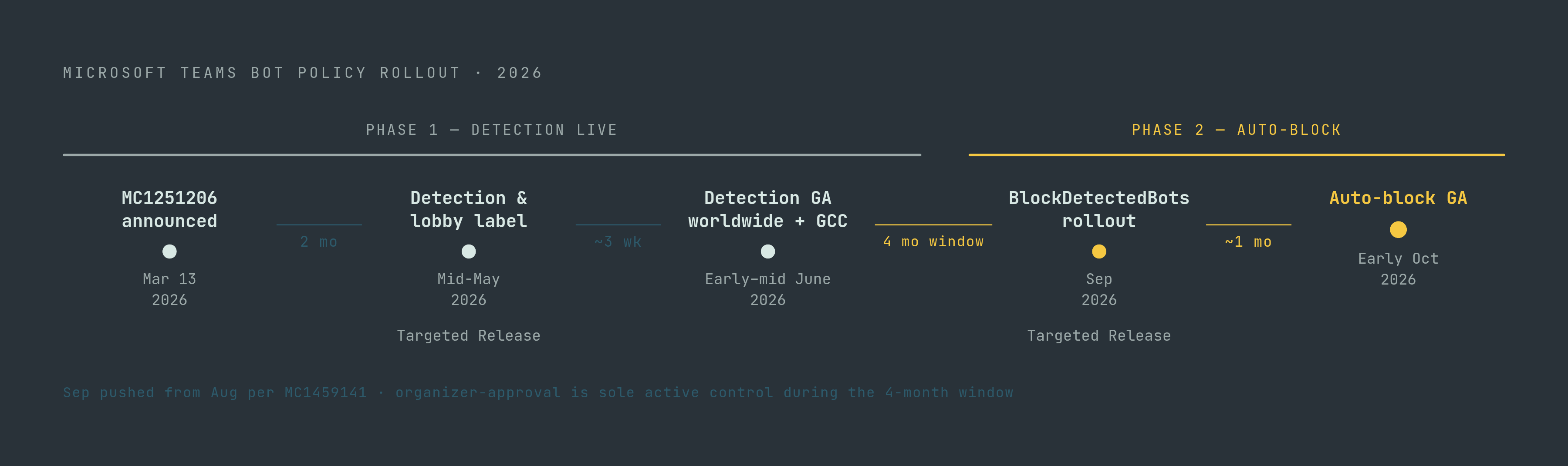
Microsoft announced the change through Message Center notice MC1251206 on March 13, 2026. In the Teams Admin Center, the policy is called "Manage external bots and their access to meetings," and its default setting, "When detected, require approval before joining," is on by default. Nobody has to opt in.
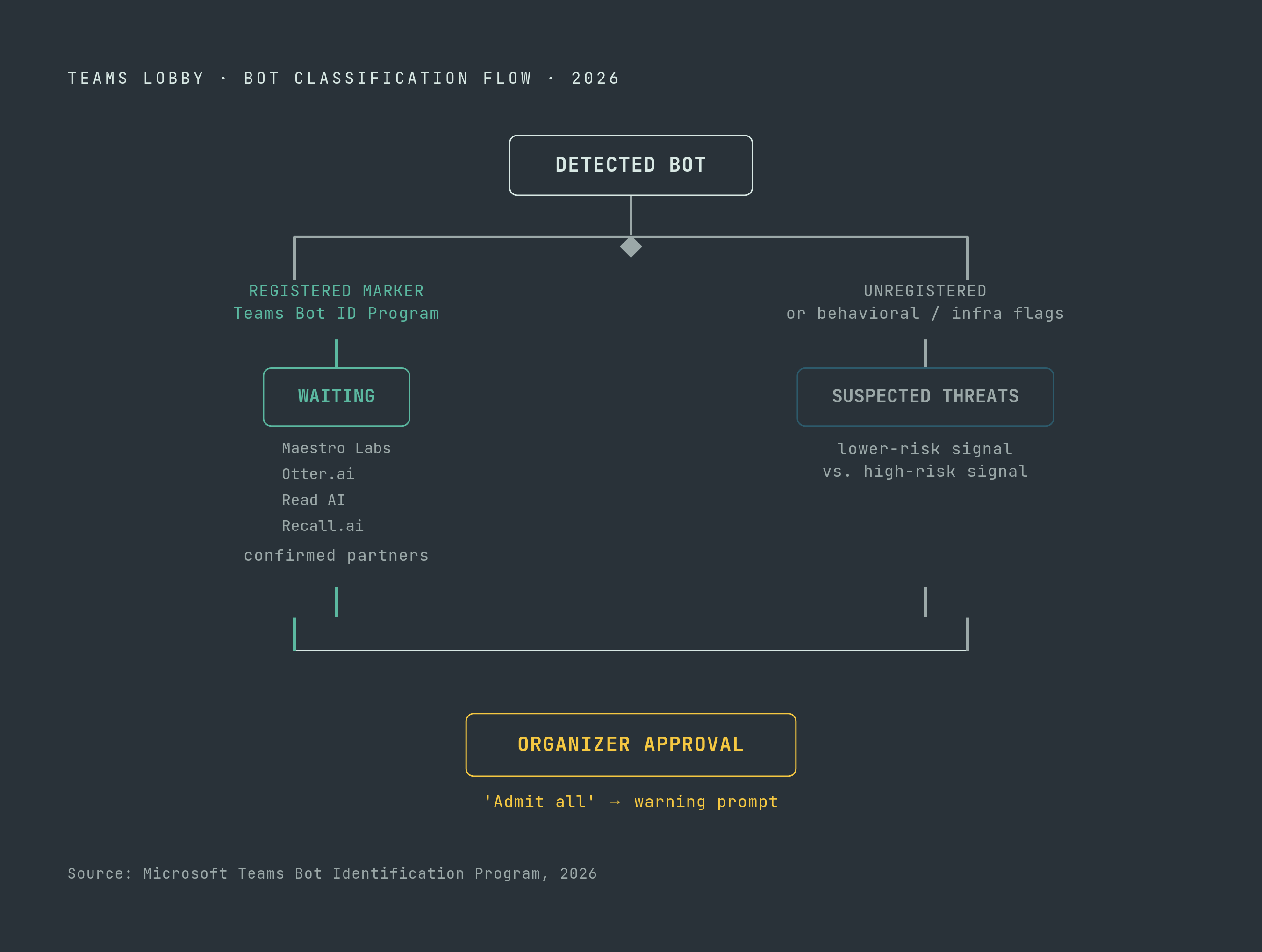
Detection runs on infrastructure and behavioral signals rather than a visual check: Infrastructure and behavioral signals are used to distinguish a bot from a human joining the call. Vendors can register through Microsoft's Teams Bot Identification Program, attaching a self-identification marker to their join requests. When Teams recognizes that marker, the bot lands in a "Waiting" group alongside ordinary verified participants rather than getting flagged as a threat. Maestro Labs, Otter.ai, Read AI, and Recall.ai are already registered partners. Anything unregistered, or anything Teams' own detection catches without a marker, lands in a separate "Suspected threats" group in the lobby.
The organizer-facing changes matter as much as the detection itself. The one-click Admit button disappears for identified bots. A confirmation prompt now appears whenever the group being admitted includes a bot. Selecting "Admit all" while a bot sits in the lobby triggers a warning first. And critically, lobby bypass settings for external participants no longer cover bots: even a meeting configured to let outside attendees walk straight in will still stop a detected bot at the door and require explicit approval. Microsoft is recommending organizations set "Who can admit from lobby" to organizers and co-organizers only, closing off the chance that some other attendee waves a bot through without the host ever seeing it. The older CAPTCHA verification system is being retired at the same time, replaced by this policy.
The rollout itself runs on two separate clocks. Bot detection and lobby labeling reached Targeted Release in mid-May 2026, with general availability for worldwide and GCC tenants following in early to mid-June. A second, later feature, the admin policy to actually block detected bots outright (Roadmap item 566201), sits on its own schedule.
The admin controls available now and what is still coming
As of mid-2026, the live version of this policy is fairly narrow. Admins can assign it to individual users or specific groups rather than the whole tenant. The currently live settings include requiring approval when a bot is detected or turning detection off entirely, with a third mode to auto-block detected bots still on the roadmap. And the lobby now visually separates "Waiting" from "Suspected threats," which is new information for an organizer deciding whether to click admit.
What's still coming is more consequential. Roadmap item 566201 introduces ExternalBotAccessMode set to BlockDetectedBots, letting admins auto-block detected external bots without any organizer-level approval step. It's configurable either in the Teams Admin Center or through the Set-CsTeamsMeetingPolicy PowerShell cmdlet, and it originally targeted an August 2026 rollout before Microsoft pushed the schedule to September for Targeted Release and early October for general availability, per update notice MC1459141.
Microsoft has also confirmed, without shipping yet, allowlists for pre-approved bots, org-wide policies that block external bots by default, audit logs and admin reporting covering bot detection and lobby activity, and more granular controls meant to fit different security postures across a tenant. None of that exists today.
A notable gap in the current implementation is the binary nature of admission itself. There's no partial-access tier. A bot that gets admitted gains access to the meeting session without any documented access restrictions. Nothing in the current implementation offers a "transcription only, no recording" middle ground. The approval step is a meaningful advance, but the all-or-nothing admission model remains a structural limitation.
What Google Meet and Zoom changed at roughly the same time
Microsoft wasn't alone. Google Meet, starting in March 2026, began flagging third-party notetaker bots, Fireflies, Otter, Fathom, Read.ai, and every comparable tool, as a "potential risk" and defaulting to deny their entry. That followed an earlier, separate change: Google Meet waiting rooms began rolling out October 23, 2025, with completion expected by November 21, according to the Google Workspace Updates blog. That feature lets hosts hold any participant in a waiting room before the call starts, mainly to stop interruptions and give organizers a moment to prepare, but it doubles as the mechanism bots now get held against too.
Zoom moved on a similar timeline. Starting March 2, 2026, any app joining a Zoom meeting from outside its own account needs an authorization token, either a ZAK or an OBF, or has to use RTMS. Zoom had already introduced a "Meeting bot" label back in 2025, but that label only applies to bots built on Zoom's own API, not third-party tools generally, so it solves a narrower problem than what Microsoft and Google are now doing.
The upshot for anyone running a multi-platform org: a bot blocked on Teams can still walk straight into a Meet or Zoom call unless someone configures each platform separately. There's no single switch. Chapman University's IT guidance, published before any of these 2026 changes, already described the waiting room as the primary line of defense, host sees "Matt's Otter.ai Bot" or "Matt's Firefly.ai Bot" sitting in the lobby, and can decline it outright. The mechanism existed before the policy layer that now surrounds it did.
How bots are built to navigate waiting rooms, and why that shapes what controls actually work
A meeting bot moves through six stages in production: authenticate, join, wait, capture, process, deliver. Each stage fails in its own particular way, and the failures that look trivial in a demo tend to show up at scale instead. The "wait" stage is the one all these new lobby policies are aimed at. The bot has to detect that it's sitting in a lobby, hold its state there, and respond correctly once someone admits it or declines it. Production bot infrastructure builds in automated retry logic for cases where admission takes too long, because a bot that just gives up after ten seconds isn't much use to anyone.
One structural fact worth sitting with: a meeting bot is always visible, always a named participant, in every mainstream implementation. There's no invisible mode within the standard bot architecture. That visibility is exactly what makes lobby-based approval workable at all, because the organizer has something concrete to look at and decide on.
Scale here is not small. Recall.ai, a major infrastructure vendor building meeting bots for other companies, runs bots at significant production scale. That's the scale these lobby policies are being tested against.
And detection is not a solved problem. Open-source projects, the screenappai/meeting-bot GitHub repository among them, ship with explicit "stealth mode" browser automation and anti-detection features built in. That means the behavioral and infrastructure signals Microsoft's detection relies on are a moving target, not a fixed rule. Lobby approval catches the bots that play by the rules and show up honestly asking to join. It does nothing for a bot actively built to look like a human. That's exactly why audit logs and tenant-level block lists, both still on Microsoft's roadmap rather than shipped, matter: they're the layer meant to catch what lobby approval structurally cannot.
The botless alternative and where it changes the compliance picture
Capturing a meeting no longer requires sending a visible participant into it. There are now two distinct approaches: the bot joins the call as a named attendee and is subject to every lobby control described above, or a native real-time media stream gets pulled without any bot ever appearing on the roster.
The bot approach still works everywhere, on every major platform, and it produces by far the richest data set: raw audio and video, chat logs, captions, screenshare events, participant emails, and granular activity signals. The botless approach is newer and, where it's supported, cleaner from a lobby-friction standpoint, but it isn't available across every platform yet.
Recall.ai's Desktop Recording SDK, launched in 2024, captures meetings through a desktop app a user installs locally rather than sending a bot into the call at all. It avoids the lobby entirely, but it trades that for a different kind of friction: someone has to actually download and install the software first. Notetakers connecting to Microsoft Teams generally do so one of three ways: natively through Teams' own integration, as a visible bot participant, or botless through desktop or system audio capture. Which mode a vendor uses determines where the data lives, what compliance regime applies, and whether the people on the call even see a recording participant at all.
The compliance checklist shifts depending on which mode is in play. SOC 2 Type II, HIPAA eligibility, and whether the vendor trains its models on customer data all still apply regardless of mode. But for bot-based tools specifically, whether the bot is registered in Microsoft's Teams Bot Identification Program is now its own line item. Recall.ai, for its part, holds SOC 2, ISO 27001:2022, GDPR, CCPA, and HIPAA compliance, and prices its pay-as-you-go plan at $0.50 an hour for recording, $0.15 an hour for built-in transcription, and $0.05 per 30-day period for storage after an initial seven free days.
What meeting organizers need to do differently starting now
The single biggest habit organizers need to break is trusting lobby bypass to mean "only the people I invited get in automatically." It doesn't, not anymore. Bot detection sits on top of bypass settings and overrides them.
When a bot shows up in the new Teams lobby, it lands in one of two groups, and the difference matters. "Waiting" means the bot is registered through Microsoft's identification program, a lower-risk signal. "Suspected threats" means it isn't, or Teams' own detection flagged it independently. Those are two different judgment calls, not one.
Before admitting any bot, an organizer should be asking a short set of questions: was this bot expected, did someone on the call actually send it on purpose? Is it registered, or unregistered? Does the meeting touch confidential, regulated, or legally sensitive material? And has the person whose bot it is actually agreed to the meeting's recording policy?
Recurring meetings deserve particular attention here. A bot invited once to a standing weekly call can rejoin every future instance automatically, without anyone re-approving it each time. Organizers running recurring meetings should audit them periodically rather than assuming each session starts clean. For meetings involving outside participants, Microsoft's recommendation stands: restrict lobby admission rights to organizers and co-organizers, so no other attendee can wave a bot through unnoticed.
Participants who don't want a bot on the call have a straightforward option, according to Chapman University's IT guidance: ask the host directly. If the meeting is being recorded or transcribed, a participant can request that it not be, and the host retains the authority to decline any bot sitting in the lobby. The "Admit all" button, meanwhile, is now something closer to a risk decision than a convenience click, which is exactly why Microsoft added a warning prompt to it: organizers had been hitting that button reflexively for years without checking who, or what, was in the queue.
What IT administrators should configure before the August 2026 BlockDetectedBots rollout
Start with what's already live. Confirm the "Manage external bots and their access to meetings" policy is turned on. It's the default for worldwide and GCC tenants as of early-to-mid June 2026, but because it can be scoped to individual users or groups rather than the whole tenant, check that the assignment actually covers the population it's supposed to.
From there, set "Who can admit from lobby" to organizers and co-organizers only. This is Microsoft's own recommendation, and it closes the one gap where a random attendee could admit a bot the host never saw.
Next, take inventory. Which third-party bot tools does the organization actually rely on, and are those vendors registered in the Teams Bot Identification Program? Maestro Labs, Otter.ai, Read AI, and Recall.ai are confirmed as early registered partners; anything outside that list will land in "Suspected threats" by default, even if it's a tool the organization approved internally.
Then get ready for the bigger change. Roadmap item 566201, ExternalBotAccessMode set to BlockDetectedBots, configurable through the Teams Admin Center or the Set-CsTeamsMeetingPolicy cmdlet, is now targeting September for Targeted Release and early October for general availability, pushed back from its original August window per notice MC1459141. Decide in advance whether the organization wants full auto-block, which suits tenants with strict confidentiality demands, or wants to stay with organizer-approval flow, which suits tenants where legitimate partner and vendor use cases need more flexibility.
It's worth building the approved-vendor allowlist now, even though the allowlist feature itself hasn't shipped yet. Microsoft has confirmed it's coming. Having that inventory ready means configuring it the moment it's available, rather than scrambling to assemble one after the fact.
Sources
- Managing AI Bots (Meeting Assistants) in Virtual Meetings - Information Systems & Technology
- Google Workspace Updates: Introducing a new waiting rooms experience in Google Meet
- GitHub - screenappai/meeting-bot: Universal meeting bot to record Google Meet, Zoom, and Microsoft Teams — with a single API. Runs in production. Free to use, extend, and scale.
- What is a meeting bot?
- Introducing smarter bot protection in Microsoft Teams meetings | Microsoft Community Hub
- msmessagecenter.com
- recall.ai
- learn.microsoft.com