Meeting Recording Bot Architecture on Zoom Google Meet and Teams
Why meeting recording bots join calls like humans instead of using official APIs.
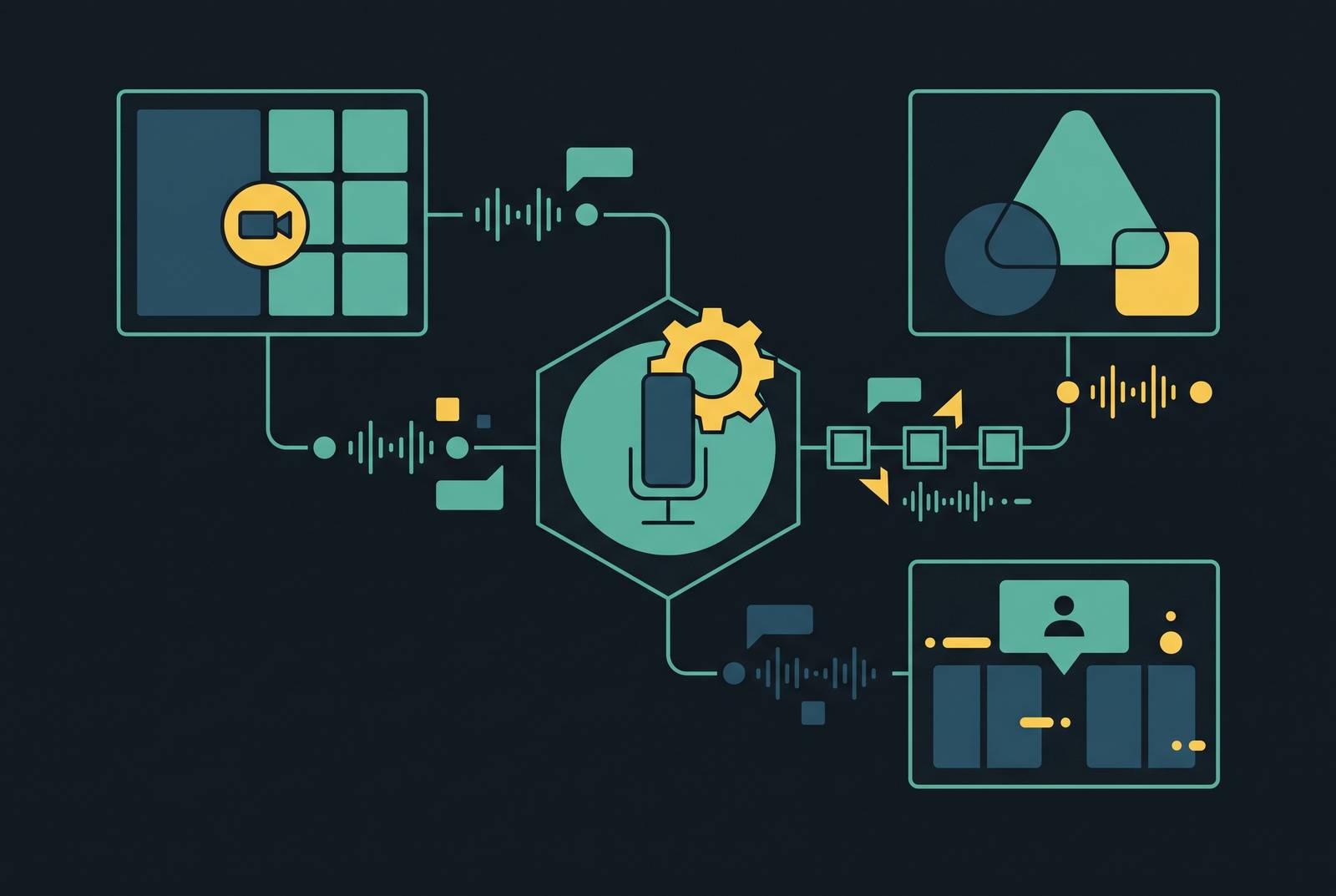
Meeting recording bots exist because Zoom, Google Meet, and Teams each expose a different, incomplete piece of the recording problem through their official APIs. None of the three hands a developer a clean way to capture audio, video, and transcript in one motion. So most working recording infrastructure joins meetings the same way a human does: as a visible participant, sitting in the call, pulling media from the inside. That workaround, not any official spec, is the real architecture of this entire category, and understanding why it won explains almost every design decision a team faces when building or buying cross-platform recording.
The scale involved isn't small. Zoom holds a majority of the video conferencing market, Teams processes billions of meeting minutes on peak days, and Google Meet counts hundreds of millions of monthly users. Multiply that by how few of those meetings get recorded, transcribed, or indexed in any usable way, and the size of the gap becomes obvious.
What a meeting bot actually is at the architectural level
A meeting bot is software that joins a call the way a person does. It takes an invite link, enters the meeting, and shows up in the participant list under a name like "Meeting Notetaker." Other attendees see it sitting in a tile like anyone else. From inside that session, it pulls audio and video directly, instead of waiting for the host platform to hand over a recording after the fact.
That visible notetaker window is only the surface. Underneath it sits a bot API whose job is to extract raw media so a language model has something to work on. Transcription and summarization are downstream problems. Getting clean audio out of a live meeting, across three platforms that don't agree on much, is the problem that has to get solved first.
Three approaches exist, and only one of them scales. A Meeting Bot API joins as a remote participant over the network, the model described above. A Desktop Recording SDK runs locally on a user's own device instead, capturing meetings without any bot ever appearing in the meeting roster. A Mobile Recording SDK remains an early and largely unsolved frontier across the industry.
The bot-as-participant model dominates for one reason: it doesn't care what any single platform's API happens to expose. That indifference is the whole point, and it's why the pattern shows up outside commercial vendors too. Open-source projects built on TypeScript, Node.js, and Playwright browser automation use the same single-job execution model, wired to either a REST API or a Redis message queue, that shows up again and again in paid products. The architecture repeats because the problem it solves is structural.
The six stages every bot moves through, from authentication to delivery
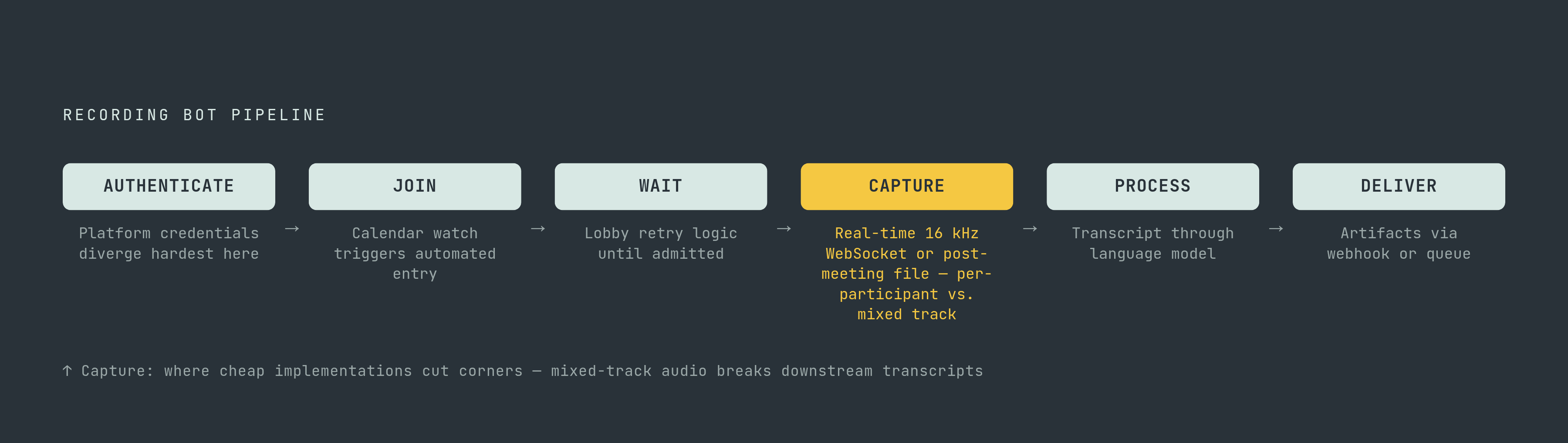
Every bot, regardless of platform or vendor, moves through the same six stages: authenticate, join, wait, capture, process, deliver.
Authentication is where the platforms diverge hardest, covered in more depth below. Joining, in a mature setup, isn't a person pasting a URL into a form. Once a user connects a calendar, the system watches for upcoming meetings and dispatches the bot automatically with the right link. Waiting covers the awkward interval where a bot sits in a lobby until a host lets it in, with retry logic built in for meetings where admission takes a while or fails outright.
Capture is where the real engineering lives, and it's also where cheap implementations cut corners. Two delivery modes are common: real-time streaming over WebSocket, typically 16 kHz mono audio in signed 16-bit PCM sent at a high message frequency, or post-meeting artifacts delivered as recorded files once the call ends. One detail matters more than it looks like it should: capturing audio in a way that preserves per-participant separation, rather than collapsing everything into one mixed track. Speaker attribution on a mixed track falls apart the moment two people talk over each other, and no amount of downstream language-model cleverness fixes that after the fact. If a vendor mixes audio into a single track, walk away. That single design choice determines whether a transcript survives a real conversation with interruptions and crosstalk, or turns into a guessing game.
Processing takes the raw transcript, cleans it up, and runs it through a language model for summarization and action items. Stored recordings, indexed this way, let a user ask plain-language questions about a meeting from three weeks ago instead of scrubbing through a recording looking for the one line that mattered. Delivery pushes the finished artifacts (transcript, summary, metadata) to storage and downstream systems via webhook or queue notification. Storage layout tends to follow a simple, consistent path structure across common cloud storage providers. Teams with real compliance obligations should connect their own storage bucket from day one. Retrofitting retention policy after the fact is the kind of project nobody budgets for and everybody eventually has to do anyway.
How Zoom's evolving SDK requirements change what bots can do
Zoom is the biggest platform in this story by volume, and its recording ecosystem reflects that: it's the most accessible across pricing tiers, and it supports two distinct recording methods. Native Zoom Recording uses Zoom's own cloud recording and imports the file automatically, but it only works if the host holds a license and has recording permissions turned on. Bot Recording, where the bot joins as a participant, is the fallback for external meetings or hosts without native recording rights, and it's more flexible in scenarios where host-side configuration is unavailable or incomplete.
A policy change lands on March 2, 2026, and it changes the calculus for every SDK-based bot in production. Zoom will require an On Behalf Of (OBF) token for Meeting SDK apps joining meetings hosted by external accounts. The token authorizes the SDK app to join alongside a specific person who has to actually be present in the call, and Zoom checks that continuously. If the authorizing user leaves, the session ends, full stop, and has to rejoin with a fresh token. Each session can hold exactly one OBF token at a time, and a bot that shows up before its authorizing user has joined gets blocked outright.
For teams running continuous or automated recording, Zoom's own guidance points elsewhere: Real Time Media Streams, which reached general availability in June 2025. RTMS delivers per-participant media through a Marketplace app without a bot joining as a participant at all, a genuinely different architecture from the join-as-attendee model everything else in this piece describes. Zoom records at 720p with a 2.5 Mbit/s bitrate, which gives it a real clarity edge over some competitors in practice. Read together, these two moves point in one direction: Zoom is walking away from bot dependency in favor of first-party media APIs, and it's telling every developer to do the same. Anyone still running SDK-based bots on Zoom in production should read the OBF requirement as a deadline, not a footnote.
Why Google Meet forces bots to use browser automation rather than any official API
Google Meet doesn't have a direct recording or transcription API at all. Recording is locked behind paid Google Workspace plans entirely, which shuts out free Gmail users regardless of what a developer builds. A Live Captions API exists, but the integration is heavy and it produces no persistent transcript at the end, just captions that disappear once the meeting does. Automated workflows therefore have to watch for events inside the browser session itself or rely on other signaling mechanisms rather than platform-native notifications.
A Meet Media API is in developer preview, but it's limited to enrolled participants and only provides three audio streams that rotate to track whoever is loudest. That's a long way from a general-purpose recording solution, and it isn't close to becoming one soon. Host-side permissions add another wrinkle: if a host unchecks "Anyone can ask to join," third-party bots get denied entry automatically, no exceptions.
Given all that, browser automation isn't a workaround here, it's the correct architecture, and treating it as anything less permanent is how projects get surprised later. Open-source implementations show the pattern clearly: a bot drives a browser-automation-controlled Chromium instance or a signed-in Chrome profile, sometimes connecting to an already-running browser through the Chrome DevTools Protocol to reduce the risk of automated-browser detection. The viewport is configured inside a virtual display sized to keep Meet's UI controls visible and clickable. In Kubernetes deployments, Chrome typically runs as a sidecar container in the same pod as the bot, reachable over localhost. Anti-detection measures matter here too, and meetings that require sign-in need an appropriately authenticated browser profile. Meet allows 1080p in some cases as of April 2023, though Zoom's higher bitrate still gives it a practical edge in recording clarity.
None of this is an oversight on Google's part. Meet's architecture is built privacy-first, and the missing APIs are a design choice, not a gap waiting to be filled. Any team building on Meet needs to treat browser automation as a permanent, first-class piece of the system, never as a stopgap until Google ships something better, because that something better isn't coming.
How Teams' admin policy layer can block bots entirely, independent of how well a bot is built
Teams runs the tightest default controls of the three platforms. External bots get routed to the lobby by default the moment they're detected, pending approval, and there's no unauthenticated path around it: Azure Active Directory setup and tenant consent flows have to happen before any media access is possible at all.
A bigger shift is coming under Microsoft 365 roadmap ID 566201. Starting mid-September 2026 for Targeted Release and early October 2026 for General Availability, tenant admins get the ability to auto-block every external AI bot detected in their environment, configured through the ExternalBotAccessMode attribute in the Set-CsTeamsMeetingPolicy PowerShell cmdlet. That moves the decision away from the meeting organizer entirely and hands it to the admin. An organizer who wants a bot in their meeting no longer gets the final say, and no amount of product polish changes that.
Microsoft's own message center notice, MC1251206, dated March 13, 2026, spelled out the reasoning directly: bots may access meetings without the knowledge or consent of the organizer or the hosting tenant, which creates data security, privacy, and compliance risk. That's Microsoft naming the problem this whole piece is about, in its own words.
The practical friction shows up well before that policy rollout. Vendor integrations built for Teams commonly require a consent-page workflow before recording can start at all, a step that simply doesn't exist in Zoom's native recording path. Put together, a Teams bot can be built flawlessly and still get switched off by one admin decision in a customer's tenant. Anyone treating Teams as just another engineering integration is going to get blindsided. Bot access on Teams is a commercial and compliance negotiation that happens tenant by tenant, and the code is the easy part, no matter how the sales deck frames it.
The consent and legal environment tightening around all three platforms simultaneously
All three platforms are tightening bot access in roughly the same window, 2025 through 2026, and that timing isn't coincidence. It reflects shared legal pressure building underneath the entire category.
Otter.ai is defending a lawsuit whose motion-to-dismiss hearing, after being pushed back three times, landed on August 3, 2026. If the case survives that motion and moves to discovery, the compliance math for every buyer of a third-party notetaker gets a lot less comfortable. Fireflies.ai faced its own BIPA class actions in December 2025 and again in March 2026, a parallel test of the same legal theory playing out against a different vendor.
Consent-by-design has become the only defensible answer to this pressure, not a premium feature some vendors happen to offer. A bot that shows itself clearly, a visible name in the participant list, a calendar-triggered join instead of a silent one, sits in a structurally safer position than a bot built to stay as invisible as possible. Certifications like SOC 2, ISO 27001:2022, GDPR, and HIPAA have stopped being a differentiator among enterprise vendors and turned into a baseline expectation instead; some vendors now hold all of them as a matter of course.
For healthcare, legal, and financial use cases, the compliance question comes before the architecture question, not after. The right infrastructure choice is the one that never needs consent bolted on later, because bolting it on later is exactly what the lawsuits above are punishing. Storage is part of that equation too: a customer connecting their own S3 bucket keeps recordings under their own retention policy from the start, while managed storage at a vendor quietly creates a data-processor relationship that needs its own legal review.
Build vs. buy: what the economics actually look like at different recording volumes
Building this from scratch means a separate authentication flow for each platform, three different webhook formats, raw media processing, storage integration, retry logic, and a consent surface, all before a single product feature gets written. Estimates put the development time saved by using a managed Meeting Bot API at around six months. For any team not in the business of maintaining browser automation as a core competency, building in-house is the wrong call, full stop, and the six-month figure is the reason why.
At 1,000 recording hours a month, a managed API runs around $650, against roughly $400 in raw compute for a self-built system. That comparison flatters the self-built option in a way that doesn't survive contact with reality: the $400 figure leaves out engineering time entirely, which is usually the larger cost by a wide margin, and the teams comparing these two numbers side by side are the ones who end up surprised six months in. Pricing among managed vendors varies a lot: some charge from $0.35 an hour across Zoom, Meet, and Teams through a single API, others structure around a flat monthly platform fee (roughly $1,000) plus a small per-hour usage charge, positioning the product as infrastructure rather than a per-seat tool. At least one vendor shifted from simple hourly pricing to a token-based model in late 2025, and heavy calendar or bot-count usage under that model can push real costs several times past the headline rate. Modeling actual usage patterns before picking a vendor isn't optional homework, it's the difference between a predictable bill and a surprising one three months in.
Full sales-intelligence platforms that bundle recording in with everything else run considerably higher, in the range of $113 to $133 per user per month plus platform fees from $5,000 to $50,000. Enterprise teams of 250 or more reps report strong returns on that spend, but smaller teams almost always do better with a lighter, narrower tool, since the recording infrastructure is just one layer inside a much bigger platform price they don't need most of. The open-source route cuts out licensing cost entirely but moves the full operational and compliance burden in-house, and that trade only makes sense for teams with real infrastructure capability and low compliance exposure to begin with. Most teams have neither, and pretending otherwise is how a six-month project becomes an eighteen-month one.
What to evaluate when choosing or building cross-platform recording infrastructure
Start with platform coverage, and be specific about it: confirm which platforms a vendor supports in production today, not on a roadmap. Zoom, Meet, and Teams each demand separate implementation work, and "cross-platform" in marketing copy often turns out to mean Zoom plus one other platform, quietly, with the third bolted on as an afterthought.
Decide early whether the use case needs real-time delivery or can live with post-meeting artifacts. Real-time streaming, 16 kHz WebSocket audio, is what makes live transcription and in-meeting interventions possible; a post-meeting MP3 is simpler to build around but rules those features out entirely. That decision should happen before vendor evaluation starts, not during it, because it eliminates half the vendor list on its own.
Check whether audio is captured per participant or mixed into a single track. Per-participant capture produces far more reliable speaker attribution, and mixed-audio transcription reliably degrades the moment two people talk at once. If a vendor can't answer this question specifically, that's the answer, and it's reason enough to stop the evaluation right there.
Finally, look closely at the consent architecture: how and when the bot announces itself, whether calendar-triggered joins are logged in a way that can be audited later, and whether consent flows are actually built into the product or left for the developer to bolt on. Given where Otter.ai and Fireflies.ai currently stand in court, that last question is now essential. It's the one that determines whether the rest of the evaluation matters at all.
Sources
- Gong Meeting Configuration: Zoom vs Google Meet vs Microsoft Teams [2025]
- GitHub - screenappai/meeting-bot: Universal meeting bot to record Google Meet, Zoom, and Microsoft Teams — with a single API. Runs in production. Free to use, extend, and scale.
- How to build a meeting bot
- Best Meeting Bot APIs (2025) Zoom, Microsoft Teams & Google Meet
- What is a meeting bot?
- Meeting Bot API Architecture: Recall.ai vs Custom Build
- recall.ai
- recall.ai